
If you’re working with on a complex enough business process then at some point the process diagram will become bloated and unreadable. This means it’s time to make hierarchical decomposition - in simple words, split the process to subprocesses. The old rule of having 5 to 9 activities per level is fully applicable to BPMN.
Let’s consider the contract process with three phases:
- Agree essential terms of the contract
- Agree the contract text
- Authorize the contract
Naive process diagrams like the following aren’t rare:

Fig.1 Naive diagram
I call it naive because it doesn’t provision early completion of the process e.g. because the agreement on the essential terms was not reached. As a rule, each subprocess should be followed by a gateway evaluating its results:
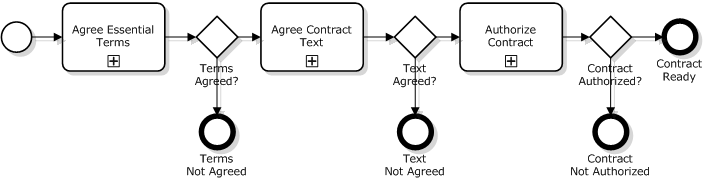
Fig.2 Subprocess results evaluated
A reasonable question is what the evaluation after the last subprocess is for - the process will end either way. The answer: because these are different completions - successful and non-successful. It’s nice to see it on a diagram and if the diagram is executable then we’d get the statistics of successful vs. non-successful ratio.
One should realize that even if an event on a BPMN diagram doesn’t lead to any explicit action, it is logged by a process engine: every process instance produces records that certain events have happened at certain times. So if we want to place milestones and control timings from the start to a milestone or from one milestone to another then we should just add intermediate none event:
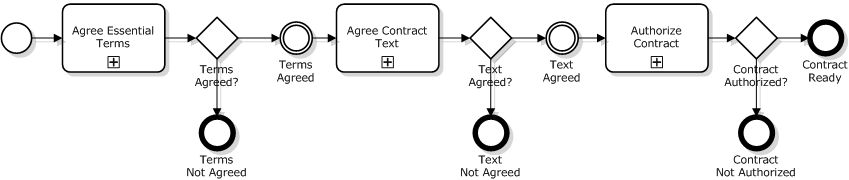
Fig.3 With milestones
BTW, we just answered to the frequently answered question: “How milestones are modeled with BPMN?”. The answer: “By intermediate events like at Fig.3.
So far so good but if we look inside a subprocess then we’d likely find the same evaluation as in the outer process. E.g. the “Agree Contract Text” subprocess:
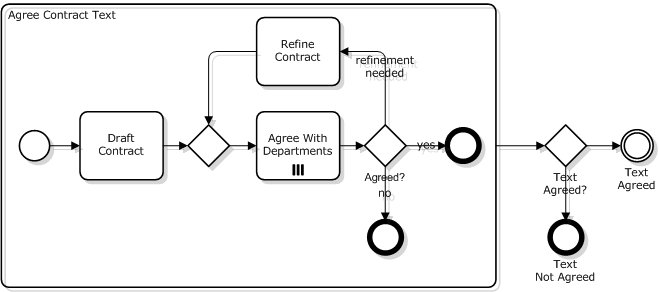
Fig.4 Double check
As we can see the evaluation of whether the text was successfully agreed is performed twice. People with programmer’s background don’t like things like this rightfully pointing out that it’s a duplication.
Now how can we get rid of the duplication? We can’t just draw two exits like at the next diagram. It’s a bad mistake: control flows cannot cross subprocess boundaries in BPMN.
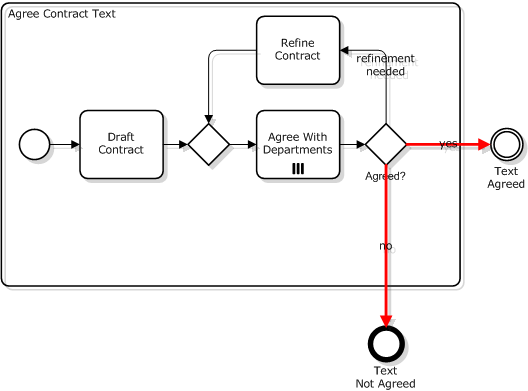
Fig.5 Invalid diagram: control flow crosses subprocess boundary
The right way is to treat one of the exits as main/desirable and others as business exceptions. For the case in question:
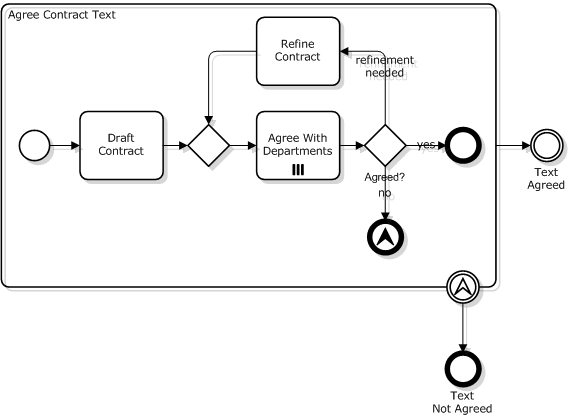
Fig.6 Subprocess exit via escalation
If the contract text is not agreed then the subprocess initiates escalation event and the control is passed to the attached event.
Complete diagram with collapsed subprocesses:
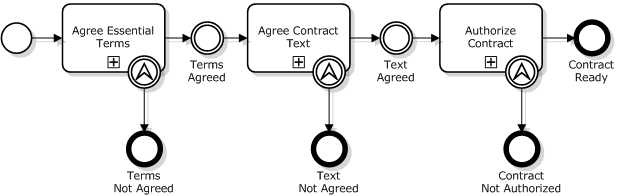
Fig.7 Escalations and milestones
Be aware that escalations were introduced only in BPMN 2.0 so if you are confined by BPMN 1.x then use error events instead:
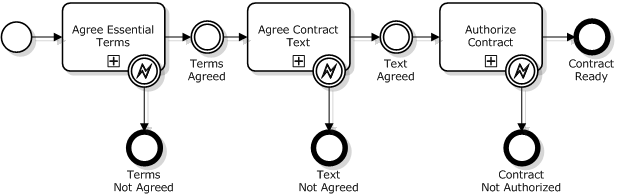
Fig.8 BPMN 1.x: errors instead of escalations
Milestones are optional here and may be omitted for compactness:
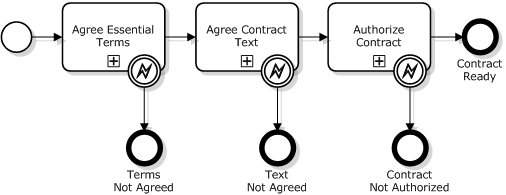
Fig.9 Compact version without milestones
Summary:
- Use patterns at Fig.2 and 9 to model subprocess; it’s a matter of taste which one to use.
- Diagrams at Fig.3 and 8 are modified with intermediate events that model milestones.
- If the tool supports BPMN 2.0 then use escalations instead of errors in Fig.8 and 9 like shown at Fig.7.
Excellent! I like the progression, and explaining the steps. I wish, however, that the “normal” routes did not have to be drawn differently than the “branching” routes. There are many cases where a person has a choice, and both choices are “normal” (and not so clearly exception). In that situation one will be forced to arbitrarily pick one route as “normal” and the other as exceptional. The “normal” route should have an event indicator on the edge of the activity as well. I realize this is not BPMN but maybe someday it will be…..
Here is my 1993 paper on a very related subject: http://kswenson.workcast.org/1993/199309_COOCS/p130-swenson.pdf
The visual notation was pre-BPMN (obviously) but you can see that finally BPMN is getting to the point where we can start to actually represent subprocesses in this way. This is first published paper of linking subprocesses in this way.
Keith
Thanks for the input.
As for the “normal” routes, I’d rather call them “successful” or “desirable”.
How about these rules of thumb:
1) Follow patterns depicted at figures 7, 8 and 9 if you want to outline a happy path (e.g. order approved vs. order declined).
2) Use patterns presented at figures 2 and 3 when branches are equally desirable (e.g. product order vs. services order).
Keith, Are you kidding? I have been teaching this since 2007 as BPMN Method and Style. Anatoly, I agree with your post, but quibble on just 2 points. First, I think Error is preferred to Escalation, as Escalation is normally non-interrupting. Maybe you are using convention of interrupting Escalation for business exceptions and Error for technical exceptions? In that case, fine, but explain the convention. Second point, you should label the end events and boundary events (matching throw-catch labels) to make the meaning clearer from the diagram alone. But overall I am totally in agreement with your post!
–Bruce
Bruce
That’s right: I’m using Error for system abnormalities and Escalation for business exceptions. BTW, there is another difference between Error and Escalation: Error terminates all active threads i.e. behave like Terminate while Escalation affects a current thread only.Taking this into account, maybe it’s better to use Error for both cases.
Thank you for point out the labelling issue. Technically one may leave a boundary event unlabelled to make it a catcher for any exception but the diagram at fig.6 is invalid: the escalation end event must have a code.
I am unaware of the different termination behavior of interrupting Escalation vs Error. Is this in the spec? Can you provide reference?
Bruce
BPMN 2.0, p.255:
- Error. This type of End indicates that a named Error should be generated. All currently active threads in the particular Sub-Process are terminated as a result.
- Escalation. This type of End indicates that an Escalation should be triggered. Other active threads are not affected by this and continue to be executed.
Очень интересная и полезная статья. Спасибо.
Очень доходчиво Брюсу и нам объяснили различие ошибки и эскалации. Теперь полная ясность
Anatoly, everything is right. But only the page is 248 (BPMN 2.0 Jaunary 2011). There is a little question. You’ve wrote, that “All currently active threads in the particular Sub-Process are terminated as a result”. But why Sub-Process? I think that all threads in Pull are terminated, arn’t they? Thanks.
Kirill
To be precise, all threads in the given context are terminated. The context may be a top-level process (pool) or a subprocess. But if there is a subprocess S2 executed in parallel to the subprocess S1 that initiated an error then S2 won’t be immediately affected by the event. It may be affected though if the error was not catched by the subprocess S1 boundary event or event subprocess - if this is the case than the error will propagate to the upper level of subprocess or top process and hence terminate all child threads including S2.
Здравствуйте Анатолий
хотелось бы узнать как правильно создавать bpmn схемы , для потдверждения запросов и подобного?
и еще вопрос возможны ли бесплатные консультации?
Самат
Основательно научиться можно на моем тренинге http://bpmntraining.ru/
Бесплатную консультацию можно попросить на форумах http://bpmnforum.ru/ https://www.facebook.com/groups/bpmnforum/
спасибо
Anatoly,
Do you know why isn’t Bizagi modeler allowing me to add a catching interrupting boundary event of type Error to a sub-process?
Of course it’s a bug. Interestingly, one may attach a catcher to task then convert the task into subprocess and it will work, more or less.
Oh, a bug! Thanks for sharing, Anatoly. I will try to use your trick…
Actually I just discovered that one needs to use Attach Event from menu rather than dragging and dropping an event onto the boundary of subprocess and it works to add error events…thought about sharing back
Do you know if Bizagi modeler allows non-interrupting event subprocesses? It looks like it does not…
Sure it does, use the context menu (right click).
Version 2.6.0.4 of modeler only allows interrupting event subprocesses. Maybe you are talking about interrupting event subprocesses, those can be created. The non-interrupting can’t.
Sorry I was wrong, didn’t get you right from the first time.
Interrupting/non-interrupting mode should be set up by the interrupting/non-interrupting flag on start event of the event subprocess. But there is no start event in the palette. Seems that the damned thing is totally broken.
I never needed event subprocesses, the attached event can always do the job.
I also resorted to boundary non-interrupting event instead of event subprocess, I had no choice. But for my needs both approaches work well. Thanks!