
Sorry, this entry is only available in Русский.
Archive for January, 2009
Process Pattern: “Internal Order”
As mentioned at “End-to-End Process Orchestration anti-pattern“, business doesn’t work like “one-two-three”: shop floors don’t switch on/off by every client’s order even at produce-to-order scenario; material purchases are arranged for a production program rather than for a single finished product. Hence an end-to-end business process is modelled not by a sequence of activities within a single process (so called process orchestration) but by several processes executed independently and exchanging data and/or messages.
In BPMN each process is modelled by a separate pool. A process chain “Order to Cash” - “Manufacturing” - “Material Supply” for example may look as follows:
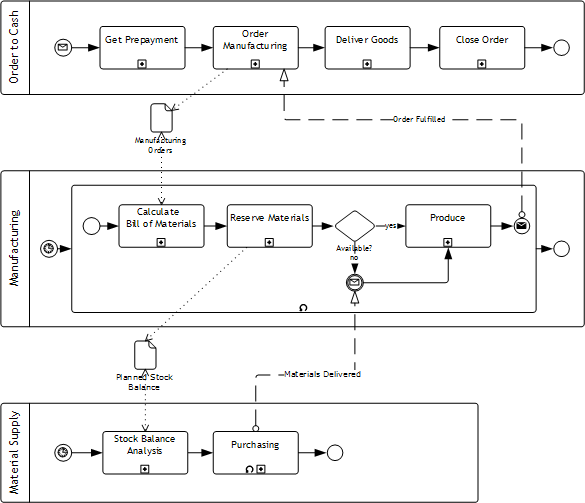
“Order to Cash” process is initiated by an incoming message - an order submitted by a client. “Manufacturing” is triggered by a timer, e.g. at the end of each working day, and handle queued orders within a cycle. If necessary materials are not available then “Manufacturing” waits for a signal from “Material Supply” that they are delivered. “Material Supply” is scheduled by a timer too and arranges purchasing for materials having the projected stock balance below the limit. (The internal orders chaing may have more links than in this example, e.g. a metallurgical plant may have inter-shop orders.)
Such asyncronous inter-process communication implies buffers between them. The buffers accumulate orders passed from process-requestor to process-provider. In the example above these are “Manufacturing Orders” and “Planned Stock Balance”. Technically such buffers may be implemented by a number of ways: message queue, database records, ERP objects at some specific state. Of course the buffer internals better to hide by wrapping them with services like “insert”, “traverse”, “extract”.
Modern BPM Suites are able to model and execute diagrams like above and this is the major BPMS advantage over traditional workflow systems. However such diagrams turned out to be difficult for analysts as Bruce Silver noted at “BPMN to Requester: Get Outta My Pool“. The major issue isn’t the notation but “asynchronous thinking”. One should develop an ability to extract separate asynchronous process from what business present to you as a single process. The answers to following questions should help: 1) what business object corresponds to a business process instance; 2) which events correspond to process instance start and stop.
For example, even in the relatively simple process of hiring an employee we can find a set of business objects: 1) a headcount item; 2) manager to HR request to fill the item; 3) a vacancy passed to a specific recruiting channel; 4) a candidate; 5) hired employee. They do not correspond to each other as 1:1 and their lifecycles aren’t synchronous. E.g. a candidate may submit his resume not caring about whether we have a vacancy for him - it’s HR task to assess which vacancy (or vacancies) it’s worth to consider for him. So a single process will hardly suffice; it depends on your business how much process there will be at the end of the day.
Worth to note that employee hiring is a classic business process example that BPM vendors love to use for their products demonstration. Yet they try to do it with a single process! Obviously such demos are made by developers, not consultants.
Final warning: please don’t consider the above as a call-up to breed too many asynchronous processes. In fact, the choice between synchronousness and asynchronousness is a non-trivial managerial decision but we’ll talk about it next time.
(Русский) Семинар по бизнес-процессам для аудитории Школы Своего Бизнеса
Sorry, this entry is only available in Русский.
(Русский) Тим Лири и другие служители карго-культа
Sorry, this entry is only available in Русский.
Processes are fun
To be more precise, it was a big fun back in 90-s; modern process disciplines are not as funny as reengineering and ISO 9000. Look at the selection of Dilbert strips on the matter. » read the rest
Connection refused: from Toshiba laptop to HTC via Bluetooth
On third attept I trained my Toshiba laptop to browse Internet through HTC 3300 connected via Bluetooth. Laptop OS: Vista, PDA OS: Windows Mobile 6.
Following standard instructions results with “connection refused” message on the laptop. Forum users give various advices, including replacing Bluetooth stack on Toshiba. Nothing helped.
Finally I found the right document at Toshiba Bluetooth Information Center: Internet via Bluetooth (TOSHIBA PC — WM6_phone — Internet). Toshiba deserves the highest mark for the document and a low mark for their sites accessability and support site search in particular. I have found this Bluetooth site some random way and it took half an hour to find the same document once again.
But it’s not the end of the story. The document instructs to launch Internet Sharing from PDA’s Comm Manager. Yet HTC Comm Manager doesn’t have such icon. Solution: file explorer - “Windows” folder - “IntShrUI”. Copy then paste the shortcut into Windows/Start Menu folder. You may rename the shortcut to e.g. “Internet Sharing”. That’s it - now follow the Toshiba instruction to connect:
- Launch Internet Sharing from PDA Start menu and tap “Connect” (assuming that GPRS is already set up on the PDA).
- Add Bluetooth connection to PDA on the laptop (done only once) and connect.